Showing posts with label junit. Show all posts

Saturday, March 06, 2021

Creating Temporary Files with JUnit 5

This post shows you how to perform unit testing using temporary files with JUnit 5. If you're still on JUnit 4, please check out my previous post!

In JUnit 5, the @TempDir annotation is used to indicate that a field or method parameter of type Path or File is a temporary directory. Each test will use its own temporary directory and when the test method has finished executing, the directory and all its contents will be deleted. (If you want to share a temporary directory between tests, you need to make the field static.)

Here is an example:

import static org.hamcrest.CoreMatchers.*;
import static org.hamcrest.MatcherAssert.*;

import java.io.IOException;
import java.nio.file.Files;
import java.nio.file.Path;

import org.junit.jupiter.api.Test;
import org.junit.jupiter.api.io.TempDir;

public class MyTest {

  @TempDir
  Path tempDir;

  @Test
  public void testWrite() throws IOException {

    // Create a temporary file.
    // This is guaranteed to be deleted after the test finishes.
    final Path tempFile = Files.createFile(tempDir.resolve("myfile.txt"));

    // Write something to it.
    Files.writeString(tempFile, "Hello World");

    // Read it.
    final String s = Files.readString(tempFile);

    // Check that what was written is correct.
    assertThat("Hello World", is(s));
  }
}

Related post: JUnit: Creating Temporary Files using the TemporaryFolder @Rule

Tuesday, December 01, 2020

Parameterized Tests in JUnit 5

A parameterized test allows you to run a test against a varying set of data. If you find yourself calling the same test but with different inputs, over and over again, a parameterized test would help make your code cleaner. To create one in JUnit 5 you need to:

  • Annotate the test method with @ParameterizedTest
  • Annotate the test method with at lease one source e.g. @ValueSource
  • Consume the arguments in the test method

The sections below describe some of the commonly used source annotations you can use to provide inputs to your test methods.

@ValueSource
This annotation lets you specify a single array of literal values that will be passed to your test method one by one, as shown in the example below:

@ParameterizedTest
@ValueSource(ints = {2, 4, 6})
void testIsEven(final int i) {
  assertTrue(i % 2 == 0);
}

@CsvSource
This annotation allows you to specify an array of comma-separated values, which is useful if your test method takes multiple arguments. If you have a large number of arguments, you can use an ArgumentsAccessor to extract the arguments as opposed to creating a method with a long parameter list. For example:

@ParameterizedTest(name = "Person with name {0} and age {1}")
@CsvSource({ "Alice, 28",
             "Bob, 30" })
void testPerson(final String name, final int age) {
  final Person p = new Person(name, age);
  assertThat(p.getName(), is(name));
  assertThat(p.getAge(), is(age));
}

@ParameterizedTest(name = "Person with name {0} and age {1}")
@CsvSource({ "Alice, 28",
             "Bob, 30" })
void testPersonWithArgumentAccessor(final ArgumentsAccessor arguments) {
  final String name = arguments.getString(0);
  final int age = arguments.getInteger(1);
  final Person p = new Person(name, age);
  assertThat(p.getName(), is(name));
  assertThat(p.getAge(), is(age));
}

By the way, note how I have also customised the display name of the test using the {0} and {1} argument placeholders.

@CsvFileSource
This annotation is similar to CsvSource but allows you to load your test inputs from a CSV file on the classpath. For example:

@ParameterizedTest(name = "Person with name {0} and age {1}")
@CsvFileSource(resources = { "data.csv" })
void testPerson(final String name, final int age) {
  final Person p = new Person(name, age);
  assertThat(p.getName(), is(name));
  assertThat(p.getAge(), is(age));
}

@MethodSource
This annotation allows you to specify a factory method which returns a stream of objects to be passed to your test method. If your test method has multiple arguments, your factory method should return a stream of Arguments instances as shown in the example below:

import static org.junit.jupiter.params.provider.Arguments.*;

@ParameterizedTest(name = "{0} is sorted to {1}")
@MethodSource("dataProvider")
void testSort(final int[] input, final int[] expected) {
  Arrays.sort(input);
  assertArrayEquals(expected, input);
}

static Stream<Arguments> dataProvider() {
  return Stream.of(
      arguments(new int[] { 1, 2, 3 }, new int[] { 1, 2, 3 }),
      arguments(new int[] { 3, 2, 1 }, new int[] { 1, 2, 3 }),
      arguments(new int[] { 5, 5, 5 }, new int[] { 5, 5, 5 }));
}

For more information, see the JUnit 5 User Guide on Parameterized Tests.

If you're still on JUnit 4 (why?!), check out my previous post on Parameterized Tests in JUnit 4.

Thursday, November 19, 2020

Testing Expected Exceptions with JUnit 5

This post shows how to test for expected exceptions using JUnit 5. If you're still on JUnit 4, please check out my previous post.

Let's start with the following class that we wish to test:

public class Person {
  private final String name;
  private final int age;
    
  /**
   * Creates a person with the specified name and age.
   *
   * @param name the name
   * @param age the age
   * @throws IllegalArgumentException if the age is not greater than zero
   */
  public Person(String name, int age) {
    this.name = name;
    this.age = age;
    if (age <= 0) {
      throw new IllegalArgumentException("Invalid age:" + age);
    }
  }
}

To test that an IllegalArgumentException is thrown if the age of the person is less than zero, you should use JUnit 5's assertThrows as shown below:

import static org.hamcrest.CoreMatchers.*;
import static org.hamcrest.MatcherAssert.*;
import static org.junit.jupiter.api.Assertions.*;

import org.junit.jupiter.api.Test;

class PersonTest {

  @Test
  void testExpectedException() {
    assertThrows(IllegalArgumentException.class, () -> {
      new Person("Joe", -1);
    });
  }

  @Test
  void testExpectedExceptionMessage() {
    final Exception e = assertThrows(IllegalArgumentException.class, () -> {
      new Person("Joe", -1);
    });
    assertThat(e.getMessage(), containsString("Invalid age"));
  }
}

Related post: Testing Expected Exceptions with JUnit 4 Rules

Saturday, March 10, 2018

JUnit Hamcrest Matcher for JSON

This post shows how you can write JUnit tests to check if an object matches a JSON string. This is important if you are implementing REST services and want to test if your service produces the expected JSON response.

A useful library for comparing JSON objects is JSONassert. First, you have to convert your Java object into a JSON string (using Jackson, for example) and then compare it with your expected JSON string using JSONassert. (You could also convert your Java object into a JSONObject but I find that it's much easier to convert it into a string.)

The following snippet shows how you can compare an object (a List, in this case) against its JSON representation using JSONassert.

import org.skyscreamer.jsonassert.JSONAssert;
import com.fasterxml.jackson.databind.ObjectMapper;

List<String> fruits = Arrays.asList("apple", "banana");
String fruitsJSON = new ObjectMapper().writeValueAsString(fruits);
String expectedFruitsJSON = "[\"apple\", \"banana\"]";
JSONAssert.assertEquals(expectedFruitsJSON, fruitsJSON, true);

In order to make it simpler to write such unit tests, I have written a Hamcrest Matcher called IsEqualJSON for comparing JSON objects. It still uses JSONassert but allows you to express your tests in a more fluent way.

The following code shows how IsEqualJSON is used:

import static org.junit.Assert.*;
import static testutil.IsEqualJSON.*;

assertThat(Arrays.asList("apple", "banana"),
           equalToJSON("[\"apple\", \"banana\"]"));

// you can also have your expected JSON read from a file
assertThat(Arrays.asList("apple", "banana"),
           equalToJSONInFile("fruits.json"));

Here is the code for IsEqualJSON (also available in my GitHub Repository):

import java.io.IOException;
import java.nio.charset.StandardCharsets;
import java.nio.file.*;
import org.hamcrest.*;
import org.skyscreamer.jsonassert.*;
import com.fasterxml.jackson.core.JsonProcessingException;
import com.fasterxml.jackson.databind.ObjectMapper;

/**
 * A Matcher for comparing JSON.
 * Example usage:
 * <pre>
 * assertThat(new String[] {"foo", "bar"}, equalToJSON("[\"foo\", \"bar\"]"));
 * assertThat(new String[] {"foo", "bar"}, equalToJSONInFile("/tmp/foo.json"));
 * </pre>
 */
public class IsEqualJSON extends DiagnosingMatcher<Object> {

  private final String expectedJSON;
  private JSONCompareMode jsonCompareMode;

  public IsEqualJSON(final String expectedJSON) {
    this.expectedJSON = expectedJSON;
    this.jsonCompareMode = JSONCompareMode.STRICT;
  }

  @Override
  public void describeTo(final Description description) {
    description.appendText(expectedJSON);
  }

  @Override
  protected boolean matches(final Object actual,
                            final Description mismatchDescription) {
    final String actualJSON = toJSONString(actual);
    final JSONCompareResult result = JSONCompare.compareJSON(expectedJSON,
                                                             actualJSON,
                                                             jsonCompareMode);
    if (!result.passed()) {
      mismatchDescription.appendText(result.getMessage());
    }
    return result.passed();
  }

  private static String toJSONString(final Object o) {
    try {
      return o instanceof String ?
          (String) o : new ObjectMapper().writeValueAsString(o);
    } catch (final JsonProcessingException e) {
      throw new RuntimeException(e);
    }
  }

  private static String getFileContents(final Path path) {
    try {
      return new String(Files.readAllBytes(path), StandardCharsets.UTF_8);
    } catch (final IOException e) {
      throw new RuntimeException(e);
    }
  }

  @Factory
  public static IsEqualJSON equalToJSON(final String expectedJSON) {
    return new IsEqualJSON(expectedJSON);
  }

  @Factory
  public static IsEqualJSON equalToJSONInFile(final Path expectedPath) {
    return equalToJSON(getFileContents(expectedPath));
  }

  @Factory
  public static IsEqualJSON equalToJSONInFile(final String expectedFileName) {
    return equalToJSONInFile(Paths.get(expectedFileName));
  }
}

Sunday, March 31, 2013

JUnit: Creating Temporary Files using the TemporaryFolder @Rule

If you have an application that writes out files, how do you test that the generated file is correct?

One approach, is to configure the application to write out to some pre-defined temporary location such as /tmp (on *nix based systems) and then delete the files after the test. But this requires a lot of boilerplate code in your unit tests and can be error prone. Sometimes, developers forget to clean up these temporary files and leave a mess behind. I have also seen cases where unit tests have written temporary files to the current directory (which contains test code) and developers have accidently checked them into source control, which definitely shouldn't happen!

The right way to deal with temporary files in unit tests is by using JUnit's TemporaryFolder Rule. With it, you no longer need to worry about where to create your temporary files or deleting them after the test succeeds or fails. JUnit handles all of that for you.

The following example shows you how to use the TemporaryFolder Rule:

import static org.hamcrest.Matchers.is;
import static org.junit.Assert.assertThat;

import java.io.File;
import java.io.IOException;

import org.apache.commons.io.FileUtils;
import org.junit.Rule;
import org.junit.Test;
import org.junit.rules.TemporaryFolder;

public class MyTest {

  @Rule
  public TemporaryFolder tempFolder = new TemporaryFolder();

  @Test
  public void testWrite() throws IOException {
    // Create a temporary file.
    // This is guaranteed to be deleted after the test finishes.
    final File tempFile = tempFolder.newFile("myfile.txt");

    // Write something to it.
    FileUtils.writeStringToFile(tempFile, "hello world");

    // Read it.
    final String s = FileUtils.readFileToString(tempFile);

    // Check that what was written is correct.
    assertThat("hello world", is(s));
  }
}

JUnit: Naming Individual Test Cases in a Parameterized Test

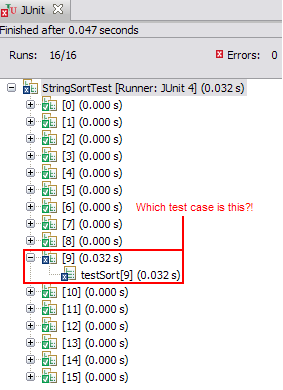
A couple of years ago I wrote about JUnit Parameterized Tests. One of the things I didn't like about them was that JUnit named the invidividual test cases using numbers, so if they failed you had no idea which test parameters caused the failure. The following Eclipse screenshot will show you what I mean:

A parameterised test without names

However, in JUnit 4.11, the @Parameters annotation now takes a name argument which can be used to display the parameters in the test name and hence, make them more descriptive. You can use the following placeholders in this argument and they will be replaced by actual values at runtime by JUnit:

  • {index}: the current parameter index
  • {0}, {1}, ...: the first, second, and so on, parameter value
Here is an example:

import static org.junit.Assert.assertEquals;

import java.util.Arrays;
import java.util.Collection;

import org.junit.Test;
import org.junit.runner.RunWith;
import org.junit.runners.Parameterized;
import org.junit.runners.Parameterized.Parameters;

@RunWith(Parameterized.class)
public class StringSortTest {

  @Parameters(name = "{index}: sort[{0}]={1}")
  public static Collection<Object[]> data() {
    return Arrays.asList(new Object[][] {
          { "abc", "abc"},
          { "cba", "abc"},
          { "abcddcba", "aabbccdd"},
          { "a", "a"},
          { "aaa", "aaa"},
          { "", ""}
        });
  }

  private final String input;
  private final String expected;

  public StringSortTest(final String input, final String expected){
    this.input = input;
    this.expected = expected;
  }

  @Test
  public void testSort(){
    assertEquals(expected, sort(input));
  }

  private static String sort(final String s) {
    final char[] charArray = s.toCharArray();
    Arrays.sort(charArray);
    return new String(charArray);
  }
}
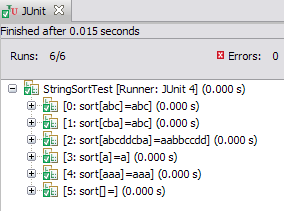
When you run the test, you will see individual test cases named as shown in the Eclipse screenshot below, so it is easy to identify the parameters used in each test case.

A parameterised test with individual test case naming

Note that due to a bug in Eclipse, names containing brackets are truncated. That's why I had to use sort[{0}], instead of sort({0}).

Saturday, September 15, 2012

Testing Expected Exceptions with JUnit Rules

This post shows how to test for expected exceptions using JUnit. Let's start with the following class that we wish to test:
public class Person {
  private final String name;
  private final int age;
    
  /**
   * Creates a person with the specified name and age.
   *
   * @param name the name
   * @param age the age
   * @throws IllegalArgumentException if the age is not greater than zero
   */
  public Person(String name, int age) {
    this.name = name;
    this.age = age;
    if (age <= 0) {
      throw new IllegalArgumentException("Invalid age:" + age);
    }
  }
}
In the example above, the Person constructor throws an IllegalArgumentException if the age of the person is not greater than zero. There are different ways to test this behaviour:

Approach 1: Use the ExpectedException Rule
This is my favourite approach. The ExpectedException rule allows you to specify, within your test, what exception you are expecting and even what the exception message is. This is shown below:

import static org.hamcrest.Matchers.*;
import static org.junit.Assert.*;

import org.junit.Rule;
import org.junit.Test;
import org.junit.rules.ExpectedException;

public class PersonTest {

  @Rule
  public ExpectedException exception = ExpectedException.none();
  
  @Test
  public void testExpectedException() {
    exception.expect(IllegalArgumentException.class);
    exception.expectMessage(containsString("Invalid age"));
    new Person("Joe", -1);
  }
}
Approach 2: Specify the exception in the @Test annotation
As shown in the code snippet below, you can specify the expected exception in the @Test annotation. The test will pass only if an exception of the specified class is thrown by the test method. Unfortunately, you can't test the exception message with this approach.
@Test(expected = IllegalArgumentException.class)
public void testExpectedException2() {
  new Person("Joe", -1);
}
Approach 3: Use a try-catch block
This is the "traditional" approach which was used with old versions of JUnit, before the introduction of annotations and rules. Surround your code in a try-catch clause and test if the exception is thrown. Don't forget to make the test fail if the exception is not thrown!
@Test
public void testExpectedException3() {
  try {
    new Person("Joe", -1);
    fail("Should have thrown an IllegalArgumentException because age is invalid!");
  } catch (IllegalArgumentException e) {
    assertThat(e.getMessage(), containsString("Invalid age"));
  }
}

Saturday, June 25, 2011

JUnit Theories

A Theory is slightly different from a parameterised test. A theory defines a "universal truth" which should hold in possibly infinite numbers of potential scenarios (as long as assumptions hold). For example, the statement, "if two objects are equal, then they must have the same hashcode", is a theory.

To set up a Theory in JUnit 4.4, you need to:

  • Annotate the test class with @RunWith(Theories.class)
  • Create test data using the @DataPoints or @DataPoint annotation
  • Write a method (the "theory") annotated with @Theory and accepting arguments of your data points
Example:
The example below shows a test for the Theory that if two objects are equal, they must have the same hashcode. You can define your data points in different ways as I've demonstrated below. When you run the test, the method testHashcodeEquals will be called with all possible permutations of your test data e.g. (foo,foo), (foo,bar), (foo,baz), (foo,1), (foo,2), (bar, bar), (bar, foo) etc.
import static org.hamcrest.core.Is.is;
import static org.junit.Assert.assertThat;
import static org.junit.Assume.assumeThat;

import org.junit.experimental.theories.DataPoint;
import org.junit.experimental.theories.DataPoints;
import org.junit.experimental.theories.Theories;
import org.junit.experimental.theories.Theory;
import org.junit.runner.RunWith;

@RunWith(Theories.class)
public class HashcodeEqualsTheory {

  @DataPoints
  public static String[] data = new String[]{"foo", "bar"};

  @DataPoint
  public static String baz = "baz";

  @DataPoints
  public static Integer[] getData(){
      return new Integer[] {1, 2};
  }

  /**
   * If two objects are equal, they must have the same hashcode
   * @param x
   * @param y
   */
  @Theory
  public void testHashcodeEquals(Object x, Object y){
      assumeThat(x.equals(y), is(true));
      assertThat(x.hashCode(), is(y.hashCode()));
  }
}
Related Posts:
Parameterized Tests in JUnit

Parameterized Tests in JUnit

A parameterised test allows you to run a test against a varying set of data. If you find yourself calling the same test but with different inputs, over and over again, a parameterised test would help make your code cleaner. To create one in JUnit you need to:
  • Annotate the test class with @RunWith(Parameterized.class)
  • Create a static method annotated with @Parameters which returns a collection of arrays. Each array in the collection represents the test data and will be injected into the constructor of the test class
  • Make sure that the test class constructor matches the array items in the Parameters method and stores the test data
  • Write some test methods annotated with @Test
Example:
The example below shows a parameterised test which tests array sorting. The data method returns a collection of arrays. Each array contains an input array and an expected output (sorted) array. When you run the test, the class is instantiated with each of these arrays and then the testSort method is called.
import static org.junit.Assert.assertArrayEquals;

import java.util.Arrays;
import java.util.Collection;

import org.junit.Test;
import org.junit.runner.RunWith;
import org.junit.runners.Parameterized;
import org.junit.runners.Parameterized.Parameters;

@RunWith(Parameterized.class)
public class ArraySortTest {

  @Parameters
  public static Collection<Object[]> data() {
      return Arrays.asList(new Object[][] {
         { new int[] { 1, 3, 2 }, new int[] { 1, 2, 3 } },
         { new int[] { 3, 2, 1 }, new int[] { 1, 2, 3 } },
         { new int[] { 1, 2, 3 }, new int[] { 1, 2, 3 } },
         { new int[] { 1, 1, 1 }, new int[] { 1, 1, 1 } },
         { new int[] { 1 }, new int[] { 1 } },
         { new int[] {}, new int[] {} },
         });
  }

  private final int[] actual;
  private final int[] expected;

  public ArraySortTest(int[] actual, int[] expected){
      this.actual = actual;
      this.expected = expected;
  }

  @Test
  public void testSort(){
      Arrays.sort(actual);
      assertArrayEquals(expected, actual);
  }
}
Documentation
Javadocs: Class Parameterized